Home › Utilities

Sonoros Remote
Peachy Ventures Ltd.
RF, audio & routing management
#6443659379
Screenshots — platforms



Description
Your Live Audio Companion. The solution to manage and monitor Routing, Audio & RF in one place. Trusted by live audio and broadcast.
Sonoros is built for a variety of applications, and is trusted by flagship TV shows, arena gigs and West End/Broadway theatre shows.
Requires Sonoros for macOS. For more info and to download for free visit https://sonoros.app/.
KEY FEATURES
• Manage wireless receivers with a clear and intuitive Device Management interface. Control common receiver parameters directly within the application.
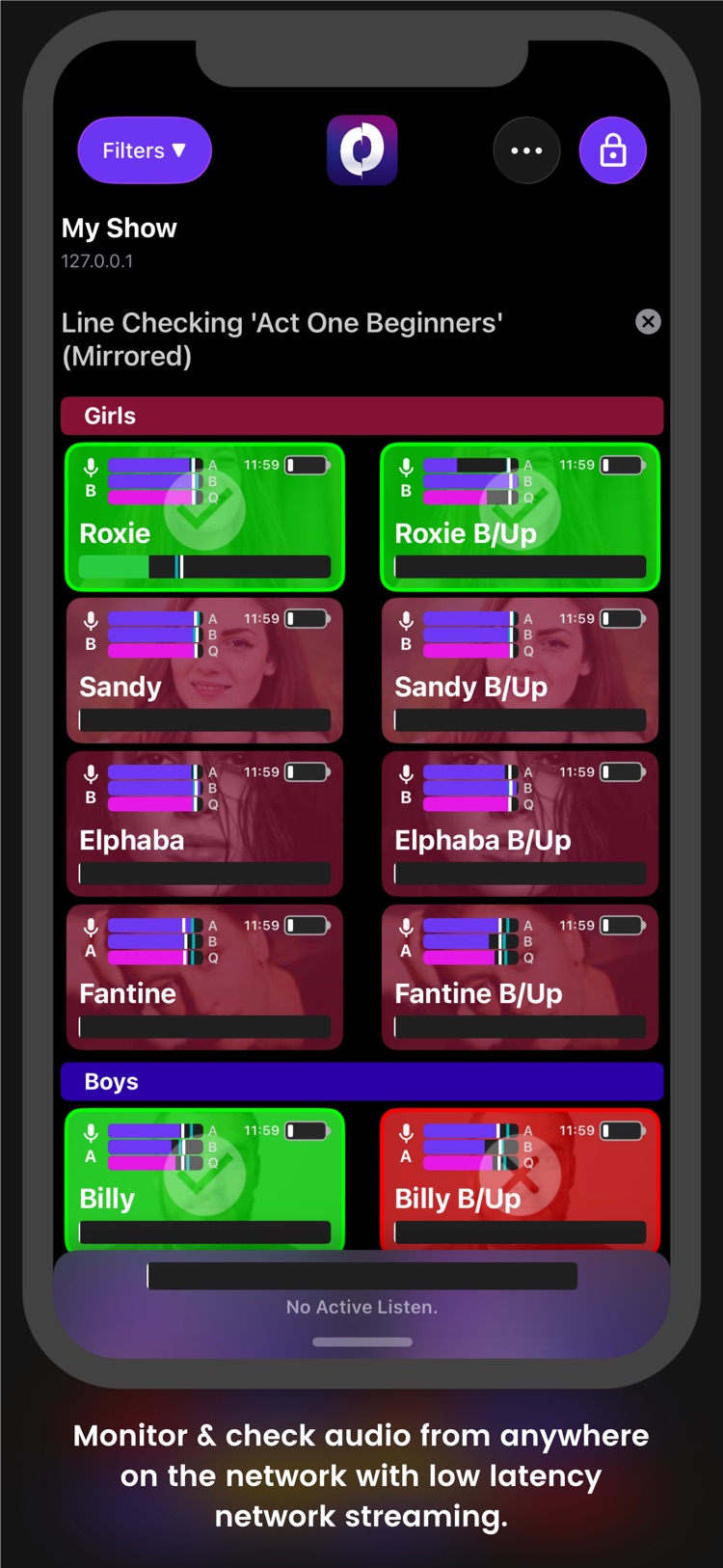
• Monitor and rewind up to 256 channels of audio with industry-leading low latency from any system audio device, from anywhere on the network.
• Monitor and respond to complex channel issues at a glance with fault detection. Quickly respond to low battery warnings and AF/RF/Quality peaks or dropouts.
• Recall up to 5 minutes of audio from any channel, from anywhere in the venue. Smoothly scrub through audio on any channel in real time, from anywhere on the network. Export problematic audio for later reference.
• Connect unlimited iOS or Mac clients to an existing Sonoros session, and gain visibility of all information and audio as if you were backstage. Control externally with OSC commands.
• Receive audio from any clock domain at any sample rate, process it and output to any other clock domain at any sample rate.
• Manage complex shows with multiple players per role, with Sonoros players support. Easily switch between player profiles, and store headshots, notes and mic assignments per player.
• Chat with other users across your Sonoros network. Create banks of custom macros to quickly send common messages. Automate macros using dynamic tags.
• Make on-the-fly routing modifications with confidence, using pre-defined macros, and never touch a patching matrix. Integrate directly with DirectOut hardware.
• Powerful organisational & layout tools. A familiar GUI helps you configure complex shows or events with ease, in minutes instead of hours.
• Supports industry standard wireless devices from Sennheiser, Shure & Sony, and more coming.
If you spot an issue or have an idea for a feature, get in touch at support@peachy.ventures.
Information
Bundle IDPeachyVentures.SonorosRemote
SellerPeachy Ventures Ltd.
Min iOS16.0
Content rating4+
Released2022-10-19
Version history 23 recorded
2.8.1
2026-06-01
Minor fixes and improvements.
2.8
2026-05-28
New in v2.8
- New macOS history charts, with error reporting.
- Charts and audio rewind now on iOS.
- Support for Sennheiser EM3732-II devices.
- Set audio monitoring channel for Spectera IEM’s.
- Added stereo monitoring support to channels.
- Respond to changes in audio device channel count and restart audio.
- Ability to load a Sonoros file from the command line.
- Ability to load a Sonoros file from cold start/as a login item.
- Improvements to licence error reporting.
- Improvements to iOS efficiency.
- Fix battery meter text blurry when grid zoomed.
- Fix clipped patching label on tickets.
- Fix clipped device names in manage devices view.
- Fix warnings indexing bug.
- Fix to escape key not clearing listen in grid.
- Fix headshot scaling on macOS clients.
- Fix to clients sometimes losing audio stream settings.
- Fix to meter thresholding/showing peak early.
- Other fixes and improvements.
New in v2
- Control routing of your wireless devices via DirectOut hardware right in Sonoros.
- Sonoros Virtual PatchBay for routing control and setup on macOS.
- New Channel Overview in Inspector with combined info & history chart, plus an overview of active warnings.
- Added support for Wisycom MRK980 and MCR54 with MRK16 receivers.
- Added support for Sennheiser Spectera devices.
- Added support for IEM device monitoring.
- Mirror Audio from clients to audio output on your server computer for IEM monitoring.
2.7
2026-04-13
- Added support for Spectera IEM's.
- Improvements to Spectera device management within Sonoros.
- New monitoring grid ticket layout.
- You can now show and hide groups within the monitoring grid.
- Other bug fixes and improvements.
2.6
2026-03-04
New in v2.6
- Support for new Sonoros pricing bands, now with monitoring for up to 256 channels!
PLEASE NOTE, EXISTING LICENSES MAY NEED A DONGLE UPDATE TO BE COMPATIBLE WITH THIS VERSION. Contact us for more information.
- Monitor IEM devices in Sonoros. Supports Sennheiser Spectera, SR G3 & G4, 2000 series, with more on the way!
- Improvements to iOS GUI. Added chat settings.
- Fix to issue connecting to Sennheiser EW-DX devices on firmware v4+.
- Fix to iOS device orientation bug.
- Other fixes and improvements.
New in v2
- Control routing of your wireless devices via DirectOut hardware right in Sonoros.
- Sonoros Virtual PatchBay for routing control and setup on macOS.
- New Channel Overview in Inspector with combined info & history chart, plus an overview of active warnings.
- Added support for Wisycom MRK980 and MCR54 with MRK16 receivers.
- Added support for Sennheiser Spectera units.
- Mirror Audio from clients to audio output on your server computer for IEM monitoring.
2.5.1
2026-01-04
Sonoros 2 is here! Packed with exciting new features, improvements & fixes.
New in v2.5.1
- Fixed an issue that could lead to clients crashing when server session ends.
- Other fixes and improvements.
New in v2
- Added support for DirectOut Prodigy MC/MP/MX, Andiamo 2/3, Ma2chbox, EXBOX.MD.
- Sonoros Virtual PatchBay for routing control and setup on macOS.
- New Channel Overview in Inspector with combined info & history chart, plus an overview of active warnings.
- Added support for Wisycom MRK980 and MCR54 with MRK16 receivers.
- Added support for Sennheiser Spectera units.
- Mirror Audio from clients to audio output on your server computer for IEM monitoring.
- Other fixes and improvements.
2.5
2025-12-14
Sonoros 2 is here! Packed with exciting new features, improvements & fixes.
New in v2.5
- Mirror Audio from clients to audio output on your server computer for IEM monitoring.
- Support for macOS & iOS 26.
- Improvements to iOS and macOS GUI.
- Other fixes and improvements.
New in v2.0
- Added support for DirectOut Prodigy MC/MP/MX, Andiamo 2/3, Ma2chbox, EXBOX.MD.
- Sonoros Virtual PatchBay for routing control and setup on macOS.
- New Channel Overview in Inspector with combined info & history chart, plus an overview of active warnings.
- Added support for Wisycom MRK980 and MCR54 with MRK16 receivers.
- Added support for Sennheiser Spectera units.
- The hidden state of the sidebar now persists between launches.
- Added keyboard shortcut for acknowledging warnings (Cmd + Shift + Space).
- Fixed an issue that could lead to toolbar buttons not being correct on macOS clients.
- Other fixes and improvements.
2.4.2
2025-09-22
Sonoros 2 is here! Packed with exciting new features, improvements & fixes.
New in v2.4.2
- NEW! Sonoros now supports Sennheiser Spectera units.
- Improvements to iOS Layout.
- Other fixes and improvements.
New in v2.0
- Added support for DirectOut Prodigy MC/MP/MX, Andiamo 2/3, Ma2chbox
- Added support for Wisycom MRK980 and MCR54 with MRK16 receivers.
- The hidden state of the sidebar now persists between launches.
- Added keyboard shortcut for acknowledging warnings (Cmd + Shift + Space).
- Fixed an issue that could lead to toolbar buttons not being correct on macOS clients.
- Other fixes and improvements.
2.1
2025-06-03
- Sonoros Virtual PatchBay for routing control and setup on macOS.
- Added global notes with pop-out window. Streams notes to all clients. On macOS and iOS.
- Pop-out windows on macOS now hide with the main window when backgrounding Sonoros.
- New macOS welcome screen, including license remaining warning.
- Added six new theme colours.
- You can now change chat text size on macOS.
- Master gain slider now responds to scroll wheel on macOS.
- Other improvements & bug fixes.
2.0
2025-04-07
Sonoros 2 is here! Packed with exciting new features, improvements & fixes.
New in v2.0
- Control routing of your wireless devices via DirectOut hardware right in Sonoros.
- Added support for Wisycom MRK980 and MCR54 with MRK16 receivers.
- The hidden state of the sidebar now persists between launches.
- Added keyboard shortcut for acknowledging warnings (Cmd + Shift + Space).
- Fixed an issue that could lead to toolbar buttons not being correct on macOS clients.
- Other fixes and improvements.
1.10
2025-01-27
We've been working hard to bring you exciting new features & bug fixes in this release.
New in v1.10
- OSC control & chat commands.
- Added F12 keyboard shortcut to clear chat.
- Selected chat macro bank now persists between launches.
- Popout chat window position, size and visible state now persists between launches.
- Mic grid zoom now available on macOS clients.
- Fixed an issue that could cause some RF meters not to draw.
- Fixed an issue that could lead to chat text not staying scrolled to bottom.
- Other bug fixes and improvements.
1.9.1
2024-12-02
We've been working hard to bring you exciting new features & squash pesky bugs in this release.
- Fixed a bug that could cause a crash when streaming headshot or show logo images.
- Other bug fixes and improvements.
1.9
2024-11-24
We've been working hard to bring you exciting new features & squash pesky bugs in this release.
New in v1.9
- Improvements to exporting audio including option to export all or multiple channels.
- Arrow keys now always change active listen while on the monitoring view.
- Chat text box always stays focused while chat is open to speed up sending messages.
- Inpector height and visible state now persist between launches.
- Added demo licensing.
- Fix to an issue that could cause long ticket titles to clip.
- Improved players layout in inspector.
- Other bug fixes and improvements.
1.8.1
2024-07-12
We've been working hard to bring you exciting new features & squash some pesky bugs in this release.
New in v1.8.1
- Fixed a bug with mic grid indexing.
- Fixed a label clipping issue in iOS settings.
New in v1.8
- Added line check feature on macOS and iOS.
- Added ability to zoom the monitoring grid while editing layout on macOS.
- Edit mode now includes group edit controls, to lock these to editing while in a show.
- Improvements to the add devices view, including sorting of devices by manufacturer.
- You can now batch delete/rearrange players and devices.
- You can now view mics within their groups in filters, with an option to disable.
- Fixed a bug that could cause the window to resize itself in manage devices view.
- Fixed a bug that could cause Sonoros to crash when deleting a device.
- Fixed a bug that could cause battery times over 10 hours to clip on iOS.
- Fixed a bug that could lead to tickets not un-dimming on iOS when coming back online or restoring from a warning.
- Fixed a bug which means players assigned to a deleted device can’t be unassigned.
- Fixed a bug in iOS that could cause the active listen meter not to reset peak holding.
- Other performance improvements and bug fixes.
If you spot a bug or have an idea for a feature get in touch at support@peachy.ventures.
1.8
2024-06-30
- Added line check feature on macOS and iOS.
- Added ability to zoom the monitoring grid while editing layout on macOS.
- Edit mode now includes group edit controls, to lock these to editing while in a show.
- Improvements to the add devices view, including sorting of devices by manufacturer.
- You can now batch delete/rearrange players and devices.
- You can now view mics within their groups in filters, with an option to disable.
- Fixed a bug that could cause the window to resize itself in manage devices view.
- Fixed a bug that could cause Sonoros to crash when deleting a device.
- Fixed a bug that could cause battery times over 10 hours to clip on iOS.
- Fixed a bug that could lead to tickets not un-dimming on iOS when coming back online or restoring from a warning.
- Fixed a bug which means players assigned to a deleted device can’t be unassigned.
- Fixed a bug in iOS that could cause the active listen meter not to reset peak holding.
- Other performance improvements and bug fixes.
1.6
2024-02-06
New in 1.6:
- Added Support for EW-DX mic receivers.
- Improvements to mic protocol networking.
- Other improvements and bug fixes
1.5.3
2024-01-02
- Added a pop out chat window on macOS.
- Headshot images now maintain transparency on import.
- Added Show Logo on iOS & macOS
- New Lock Screen layout to integrate show logo.
- Fixed a networking issue that could cause Sonoros on iOS to lock up when reopened.
- Fixed a layout bug with iOS battery meters.
- Fixed an issue that could lead to different device tickets not drawing meters correctly on iOS.
1.5.2
2023-12-15
New in v1.5
- Added ‘Dynamic Tags’ to chat macros.
- Added Level Meter Average Indicators.
- Added option to turn off chat message timestamps.
- Added option to mirror filter choices on your server to clients.
- Added ‘Clear chat’ option to iOS.
- New RF Active Layout to more clearly show which antenna mics are currently using.
- New styling for when Sonoros cannot see one of your devices on the network.
- New styling on mic tickets for warnings.
- Improved level meter accuracy on macOS & iOS.
- Improved CPU/GPU performance on iOS & macOS.
- Improved reliability of finding Sonoros sessions over the network.
- Fixed a bug with quality metering on iOS.
- Improved chart layout on MacOS.
New in 1.5.2
- Added 'lock' mode to iOS.
1.5.1
2023-11-29
- Added ‘Dynamic Tags’ to chat macros.
- Added Level Meter Average Indicators.
- Added option to turn off chat message timestamps.
- Added option to mirror filter choices on your server to clients.
- Added ‘Clear chat’ option to iOS.
- New RF Active Layout to more clearly show which antenna mics are currently using.
- New styling for when Sonoros cannot see one of your devices on the network.
- New styling on mic tickets for warnings.
- Improved level meter accuracy on macOS & iOS.
- Improved CPU/GPU performance on iOS & macOS.
- Improved reliability of finding Sonoros sessions over the network.
- Fixed a bug with quality metering on iOS.
- Improved chart layout on MacOS.
1.4.4
2023-06-02
We've been working hard on bringing you exciting new features & squashing pesky bugs in this release.
New in v1.4:
- You can now view RF, AF, Quality & Battery warnings on each mic ticket with our 'badness' feature on both Mac & iOS.
- Set your own warning thresholds in Show Setup, including an option to auto-acknowledge.
- Acknowledge all active warnings with the clear warnings button in the toolbar.
- Added the event log to iOS.
- The global event log can now be accessed from the toolbar on Mac.
- You can now export your event log to a txt file on both Mac & iOS.
- Improved Chat Window on both Mac & iOS, including bigger text.
- Added Chat Flash feature on both Mac & iOS, including more obvious flashing when you receive a new message.
- Fixed a bug in the master monitoring gain slider that didn’t properly set negative gains.
- Log/Chat Message Timestamps now respond to Daylight Savings.
- View Tidy Ups & Improvements.
- Other bug fixes & improvements.
New in v1.4.4:
- Fixed an issue with player notes not being able to scroll on macOS.
- Fixed an issue with player notes not being recalled or set properly on iOS and macOS.
If you spot a bug or have an idea for a feature get in touch at support@peachy.ventures.
1.4.3
2023-04-27
We've been working hard on bringing you exciting new features & squashing pesky bugs in this release.
- You can now view RF, AF, Quality & Battery warnings on each mic ticket with our ‘badness’ feature on both Mac & iOS.
- Set your own warning thresholds in Show Setup, including an option to auto-acknowledge.
- Acknowledge all active warnings with the clear warnings button in the toolbar.
- Added the event log to iOS.
- The global event log can now be accessed from the toolbar on Mac.
- You can now export your event log to a txt file on both Mac & iOS.
- Improved Chat Window on both Mac & iOS, including bigger text.
- Added Chat Flash feature on both Mac & iOS, including more obvious flashing when you receive a new message.
- Fixed a bug in the master monitoring gain slider that didn’t properly set negative gains.
- Log/Chat Message Timestamps now respond to Daylight Savings.
- The chat box on iOS now dismisses the keyboard once you've sent your message (iOS15+)
- Other view Tidy Ups & Improvements.
- Other bug fixes & improvements.
If you spot a bug or have an idea for a feature get in touch at support@peachy.ventures.
1.4.2
2023-04-15
We've been working hard on bringing you exciting new features & squashing pesky bugs in this release.
- You can now view RF, AF, Quality & Battery warnings on each mic ticket with our ‘badness’ feature on both Mac & iOS.
- Set your own warning thresholds in Show Setup, including an option to auto-acknowledge.
- Acknowledge all active warnings with the clear warnings button in the toolbar.
- Added the event log to iOS.
- The global event log can now be accessed from the toolbar on Mac.
- You can now export your event log to a txt file on both Mac & iOS.
- Improved Chat Window on both Mac & iOS, including bigger text.
- Added Chat Flash feature on both Mac & iOS, including more obvious flashing when you receive a new message.
- Fixed a bug in the master monitoring gain slider that didn’t properly set negative gains.
- Log/Chat Message Timestamps now respond to Daylight Savings.
- Other view Tidy Ups & Improvements.
- Other bug fixes & improvements.
If you spot a bug or have an idea for a feature get in touch at support@peachy.ventures.
1.3
2022-11-07
- You can now assign players to your mics in Sonoros! Meaning you can see player info on Sonoros Remote.
- Fixed a few pesky layout bugs.
- Other bug fixes & improvements.
1.0
2022-10-19
—
Region availability 1 of 1 storefronts
| Store | Price | Ratings | Avg | Version |
|---|---|---|---|---|
| US | Free | 0 | — | 2.8.1 |